Work / Case study
Student onboarding that runs itself for a training academy
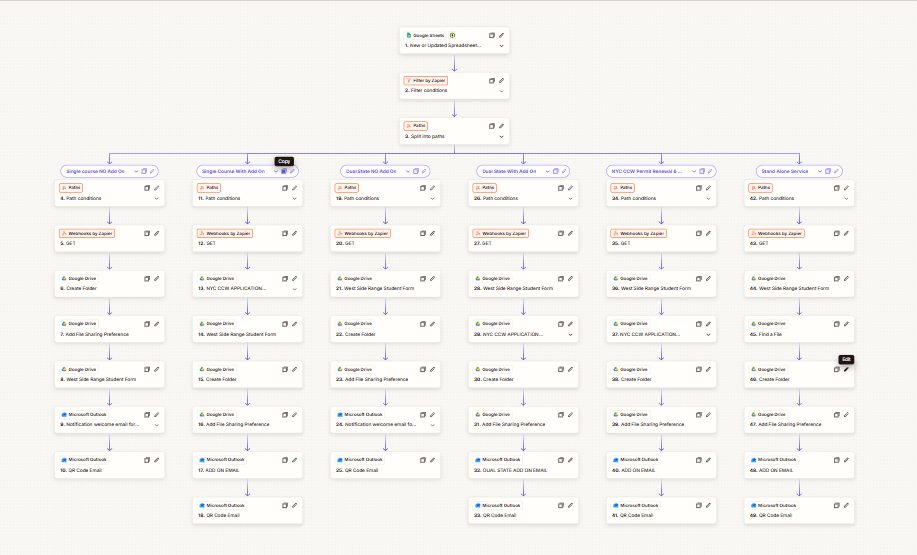
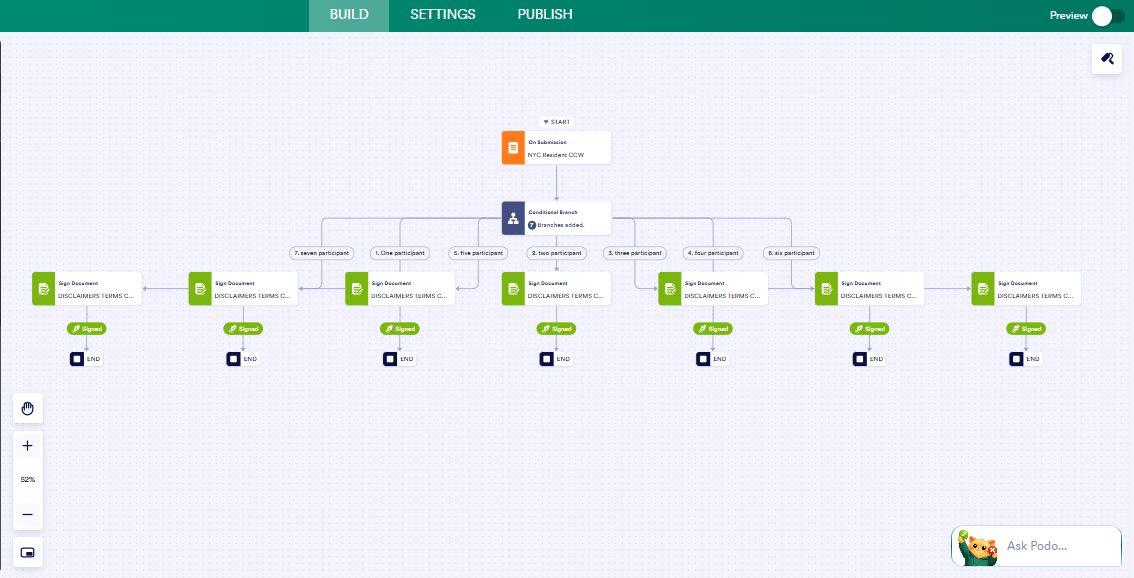
When a student enrols, the right course path runs. Folders and documents are created in Google Drive and shared, welcome and QR code emails go out, and each participant gets a waiver to sign.
The problem
Every enrolment meant making folders, copying the right forms, sharing them and sending several emails by hand. Across six course types it was slow and easy to get wrong.
What I built
Enrolment→6 course paths→Drive folders and forms→Emails→Signed waivers
- A new enrolment row in Google Sheets starts the Zap.
- Filters and paths send the student to one of six course types.
- Google Drive folders and the right forms are created and shared.
- Welcome, add on and QR code emails are sent from Outlook.
- The signing form branches by the number of participants so everyone signs their own waiver.
6 course types onboarded automaticallyAdmin that used to be done by hand for every student now happens on its own.
Services used: Workflow Automation.
Free 30 minute call
Find out how many leads you're losing.
Thirty minutes, no pitch deck. Tell me how leads reach you now and I'll show you where they slip away and what I'd build to catch them.